
Retro game maker: make Game Boy Color, GBA, and N64-style games
A retro game maker lets you build a game that looks and plays like it came from an old console, without learning that console's tools. Shiny Gen has engines for several retro machines, and an AI agent does the building while you describe what you want.
It costs nothing to make, play, and share. A downloadable ROM file needs any one purchase, from $2.99.
What a retro game maker is
The phrase covers two different things. Some tools only give you a pixel-art look on a modern engine. Others build for the old hardware's real rules: a fixed screen size, a small color budget, a limited number of sprites, and a few sound channels.
The engines in Shiny Gen are the second kind. A game for the Game Boy Color is fitted to that machine instead of being a modern game wearing a filter, which is why it can end as a file that real hardware understands.
You do not need to know the machine. You say what the game is, the agent writes the code, makes or fits the art and the music, and plays the result with the keypad to catch bugs before you do.
The retro look is a set of limits
Small limits are what give old games their style, and they also keep a game finished. A short palette forces clear shapes. A small screen forces a simple layout. Here is what each retro engine allows.
Game Boy Color
A 160 by 144 screen. Palettes of four colors, up to 40 sprites, and four sound channels, with no 3D. It is the look of chunky tiles and chiptune.
Game Boy Advance
A 240 by 160 screen. Palettes of 16 colors, up to 128 sprites at once, sampled sound, and floors that rotate for racing games.
N64-class
Real-time 3D in the style of early polygon games, shown at 320 by 240 in our catalogue. Think blocky worlds, simple shapes, and a camera that moves.
Every build of a Game Boy Color or Game Boy Advance game reports how full the cartridge is, so a limit shows up before it breaks anything. When the picture you ask for has too many colors, the engine fits it to the palette and the preview shows the result.
The consoles you can target
| Console style | File you can export | Where it plays | Real hardware check |
|---|---|---|---|
| Game Boy Color | .gbc | Emulators, flash carts | Yes, through flash carts |
| Game Boy Advance | .gba | Emulators, flash carts | Yes, through flash carts |
| N64 | .z64 | Emulators | Emulators only so far |
| DS | .nds | Emulators | Emulators only so far |
| GameCube | .dol | Emulators | Emulators only so far |
Each engine builds new games made inside Shiny Gen. None of them is an emulator, and none can load someone else's ROM.
The agent does the building
- Start a new game. In Shiny Gen press +, choose New, and pick a retro engine. The project begins empty on purpose.
- Say what it is. A sentence is enough to begin: a top-down adventure, a kart race, a puzzle with a cat. You can add art, music, and rules by chat afterwards.
- Watch it get tested. The agent builds the game, runs it, and fixes what breaks, so the first thing you play already starts.
- Change anything. Ask for a harder boss, a new tune, or another map. Code is open to you too, and editing it by hand costs nothing.
Retro games from the catalogue
Each one was made by the agent and is in the free catalogue. Game Boy Color and GBA art is shown at its tiny native size, scaled up so the pixels stay sharp.
- Game Boy Color
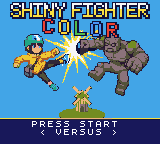
Shiny Fighter Color
Choose from eight fighters, from a parcel courier to a chef.
 Game Boy Color
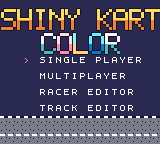
Shiny Kart Color
A top-down racer with tinker-bots driving little buggies.
 Game Boy Advance
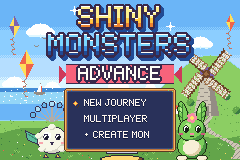
Shiny Monsters Advance
A monster-collecting adventure that ends on Pinwheel Hill.
 Game Boy Advance
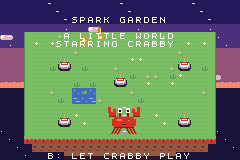
Spark Garden
A small crab catches sparks and turns them into a garden.
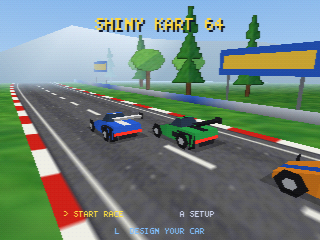 N64-class
Shiny Kart 64
Three-lap races against computer drivers on three tracks.
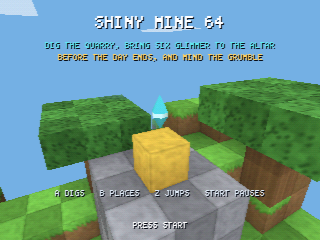 N64-class
Shiny Mine 64
Dig out blocky stone and haul it to the altar in one day.
In the browser, or as a real file
You can play a retro game in the browser from the first minute, with nothing to install. That is the quickest way to test an idea and to share it, because a link works for anyone.
A file is for a different moment: when you want the game to run in an emulator you already use, or on a cartridge. A .gba or .gbc file goes on a flash cart's SD card. The AI retro game maker guide walks through the export step by step, and the ROM export post covers save types for each engine.
Want a Game Boy game on a Nintendo 64 cartridge? Cart64 is a free browser tool from the same team that turns a Game Boy Color or Game Boy Advance file you made into a .z64.
What is free and what is not
Free
Making a game, playing it in the browser, and sharing a link. Editing code by hand is free as well.
Uses gems
AI generation of code, art, and sound. New accounts start with free gems and a few free AI turns, then one free AI prompt arrives each day.
Needs a purchase
Downloading a ROM, .dol, or .nds file. Any one purchase from $2.99 unlocks export, and it is a one-time unlock.
The full breakdown is on the pricing page.
Questions about retro game makers
What is a retro game maker?
A tool for making games in the style of older consoles. Some only imitate the look, while Shiny Gen's engines build for the real limits of the Game Boy Color, the Game Boy Advance, and other retro machines.
Can I make a retro game without coding?
Yes. You describe the game and the agent writes and tests it. The code is there if you want to read or change it, but nothing requires you to.
Which retro consoles can I make games for?
Game Boy Color, Game Boy Advance, an N64-class engine, GameCube, and DS. The first two have been tested on real hardware through flash carts, and the others only in emulators.
Is it the same as a retro filter on a modern game?
No. A filter changes how a finished game looks. These engines hold the game inside the machine's palette, screen size, and sprite limits from the start.
Do I get a real ROM file?
Yes, a .gbc, .gba, or .z64 ROM, or a .nds or .dol file for the DS and GameCube engines. Exporting needs any one purchase, from $2.99, and the file belongs to you.
Is a retro game maker free to try?
You can start without paying. You make and play for free, and generation draws on the gems every new account receives, plus one free AI prompt a day after the first few turns.
Can I make retro games on my phone?
Yes, in a mobile browser or in the iPhone, iPad, and Android apps. The Android app cannot save a ROM file yet, so open the game in a browser with the same account to export it.
Can it play my old cartridge ROMs?
No. It makes new games only, and it cannot open, play, or convert commercial or third-party ROMs.
Make the game you wanted as a kid
Choose a retro engine, describe the game, and start playing it in a minute.